Quick answer
Multiply the download size in gigabytes by 8,000, then divide by your connection speed in megabits per second (Mbps). The result is the theoretical minimum time in seconds. For example, 50 GB at 100 Mbps is 4,000 seconds (1 hour 6 minutes 40 seconds). Real downloads usually take longer, so divide by an efficiency figure, such as 80%, for a planning estimate.
The quickest way to know how long a PS5 download will take is to do the arithmetic yourself. The formula is simple, but two things trip people up: internet speeds and file sizes use different units, and the speed you pay for isn’t the speed every download gets.
This guide explains the formula, works through examples and shows how to get from a theoretical number to a realistic one. If you’d rather skip the maths, the Game Download Time Calculator does it for you.
Mbps and MB/s are different units
Internet speeds are usually quoted in megabits per second (Mbps). File sizes are given in megabytes (MB) or gigabytes (GB). A byte is 8 bits, so:
- 1 MB/s = 8 Mbps
- 100 Mbps = 12.5 MB/s at most
Notice the capital and lower-case B. MB is megabytes and Mb is megabits. Confusing them makes an estimate eight times too optimistic.
Larger units follow the same pattern. This guide uses decimal units, which is how network speeds are defined:
- 1 GB = 1,000 MB
- 1 Gbps = 1,000 Mbps
Internet speed vs download speed
Two different things are often called “speed”:
- Your internet speed is the capacity of your connection, the figure on your plan or a speed test result.
- Your download speed is the rate at which one particular download actually arrives on your console.
The download speed can’t exceed the internet speed, and it’s frequently lower. The reasons are covered below.
How game size affects download time
Download time scales directly with size. Double the size and, at the same speed, you double the time. That’s why large game installs can take hours on a modest connection while a small patch takes minutes.
Use the size of this download, not the game’s total install size. An update or patch is often smaller than the full game, and the store page or the console’s download screen shows the size of what’s actually being downloaded.
The download-time formula
Seconds = (Size in GB × 8,000) ÷ Speed in Mbps
Where the 8,000 comes from: 1 GB is 1,000 MB, and each megabyte is 8 megabits, so 1 GB = 8,000 megabits. Dividing the total megabits by the megabits per second gives the time in seconds.
This gives the theoretical minimum: the time the download would take if it received your full connection speed from start to finish. To turn it into a planning estimate, divide by an efficiency figure:
Estimated seconds = Theoretical seconds ÷ (Efficiency % ÷ 100)
Three different numbers
It helps to keep these separate:
| Number | What it is | Where it comes from |
|---|---|---|
| Theoretical download time | The fastest possible time at 100% of your connection speed | The formula above |
| Estimated download time | A planning figure that allows for real-world overhead | The theoretical time divided by an efficiency assumption you choose |
| Actual download time | How long the download really took | Your own observation. Nothing can predict it exactly |
The efficiency figure is an assumption, not a measurement. Our calculator starts at 80% because it’s a simple round number for planning. It isn’t derived from measurements of any network or provider, and you can change it. To base it on your own connection, run a speed test on the network your console uses and divide the result by your plan speed. For example, 70 Mbps measured on a 100 Mbps plan is 70%.
Worked examples
All times are rounded to the nearest second.
| Download | Speed | Theoretical minimum | Estimate at 80% |
|---|---|---|---|
| 1.5 GB update | 25 Mbps | 8 min | 10 min |
| 50 GB game | 100 Mbps | 1 h 6 min 40 s | 1 h 23 min 20 s |
| 120 GB game | 500 Mbps | 32 min | 40 min |
| 120 GB game | 1 Gbps (1,000 Mbps) | 16 min | 20 min |
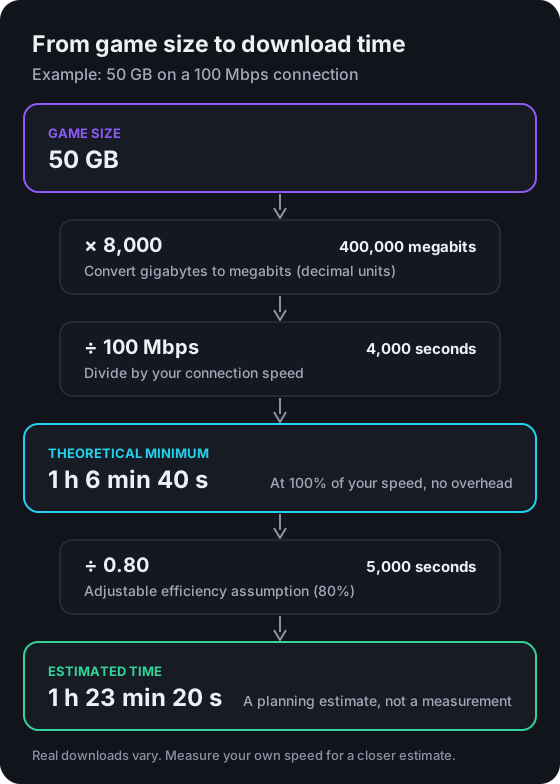
Working through the second row step by step:
- Convert to megabits: 50 GB × 8,000 = 400,000 megabits.
- Divide by speed: 400,000 ÷ 100 Mbps = 4,000 seconds.
- Convert to hours and minutes: 4,000 seconds is 1 hour (3,600 s) plus 400 seconds, which is 6 minutes 40 seconds. That’s the theoretical minimum.
- Apply efficiency: 4,000 ÷ 0.80 = 5,000 seconds, or 1 hour 23 minutes 20 seconds. That’s the estimate.
These figures are illustrative arithmetic, not predictions for any particular game or provider.
Why real downloads take longer
Even on a good connection, a download rarely holds your full plan speed throughout. Common reasons:
- Wi-Fi signal. Distance from the router, walls, floors and interference from nearby networks can all reduce throughput.
- Other activity on your network. Streaming, video calls and other downloads share the same connection.
- Congestion. Your provider’s network can be busier at certain times of day.
- Routing. The path between you and the download server affects how fast data can flow.
- Server-side limits. Download servers can be busy, particularly around big releases, and may send data more slowly than your connection could receive it.
- Installation after downloading. Some downloads are followed by an installation or copying stage, which the formula doesn’t include.
None of these can be predicted precisely, which is why the result is an estimate rather than a promise.
Wi-Fi vs Ethernet
A wired Ethernet connection isn’t affected by Wi-Fi signal problems. It doesn’t make your internet plan faster, but it can help your console use more of the speed you already have, more consistently. Results depend on your equipment and home.
If a cable isn’t practical:
- Try reducing the distance and the number of walls between the console and the router.
- Try moving the router out of enclosed spaces such as cabinets. Your router manufacturer may give placement advice.
- Compare results: if downloads are noticeably faster with a temporary cable, Wi-Fi is likely to be limiting your speed.
If your console can’t connect at all, see our PS5 connection troubleshooting guide.
How to improve download conditions
These steps may help. None of them guarantees a faster download:
- Use a wired connection where you can.
- Pause other heavy use of your network during a large download.
- Restart your router if it has been running for a long time and speeds seem lower than usual.
- Try a different time of day if your provider’s network is busy in the evenings.
- Free up storage first so the download doesn’t stall for lack of space. Our storage expansion guide explains how.
Common calculation mistakes
- Treating Mbps as MB/s. This makes the estimate eight times too short. 100 Mbps is 12.5 MB/s, not 100 MB/s.
- Using the full game size for an update. Use the size of what’s actually being downloaded.
- Using plan speed as a promise. Your plan speed is the theoretical maximum. Use a measured speed or an efficiency figure for planning.
- Mixing Gbps and Mbps. 1 Gbps is 1,000 Mbps. Entering “1” in a field that expects Mbps gives a result 1,000 times too long.
- Mixing decimal and binary sizes. A figure in GiB is about 7% larger than the same number in GB.
- Forgetting installation time. The formula covers the transfer only.
To check your own numbers quickly, use the Game Download Time Calculator. It shows the theoretical minimum, the estimate and each step of the working.
Frequently asked questions
How do I convert Mbps to MB/s?
Divide by 8. A 100 Mbps connection can move at most 12.5 megabytes per second. Internet speeds are quoted in megabits, and file sizes in megabytes or gigabytes, which is why the difference matters.
Why is my download slower than my internet plan speed?
Your plan speed is a maximum for the connection, not a guarantee for every download. Wi-Fi signal, other devices on your network, congestion, routing and how quickly the download server sends data can all reduce what you actually get.
What efficiency figure should I use?
Our calculator uses 80% as a starting assumption, which is a planning figure rather than a measurement. For a closer estimate, run a speed test on the same network your console uses and divide the measured speed by your plan speed. 70 Mbps measured on a 100 Mbps plan is 70%.
Does the estimate include installation time?
No. The formula covers the transfer only. Some downloads are followed by an installation or copying stage, which adds time that depends on the game and the console rather than your connection.
Is 1 GB 1,000 MB or 1,024 MB?
In this guide and our calculator, 1 GB is 1,000 MB (decimal units), which is how internet speeds are measured. Some software uses binary units, where 1 GiB is 1,073,741,824 bytes, about 7% larger than 1 GB. Mixing the two causes small errors.
Editorial review
Written and reviewed by the Vibe Game One Editorial Team. This guide explains official documentation and general technical concepts. It isn’t based on hands-on testing of specific products.
Content last reviewed . Vibe Game One is independent and is not affiliated with Sony Interactive Entertainment. Read how we research and update guides in our editorial policy.